
Scala Essentials
chapter, Online, 2016
Scala Essentials
Data Types in Scala
- A Data type tells the compiler about the type of the value to be stored in a location
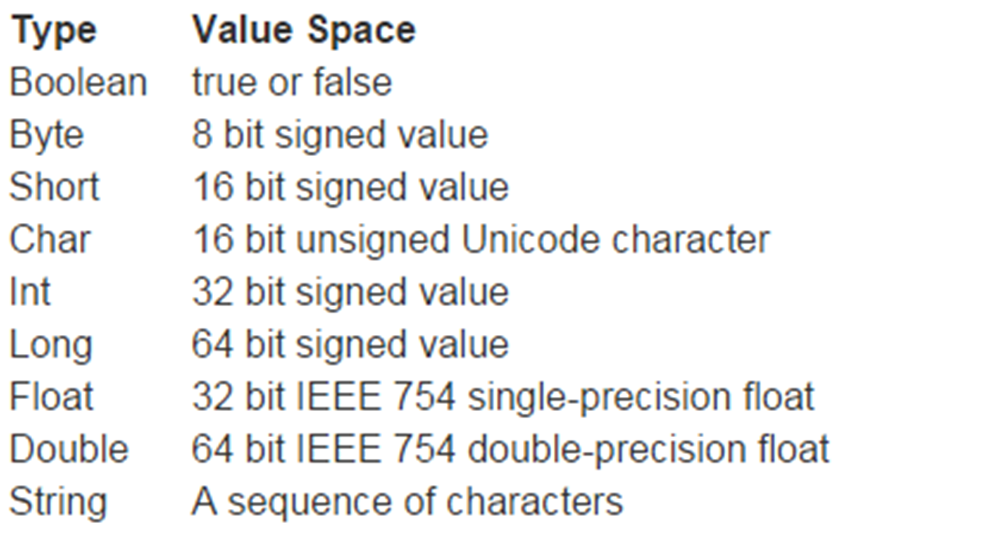
- Scala comes with the following built-in data types which you can use for your Scala variables
 —
—Data Types in Scala (cont’d)
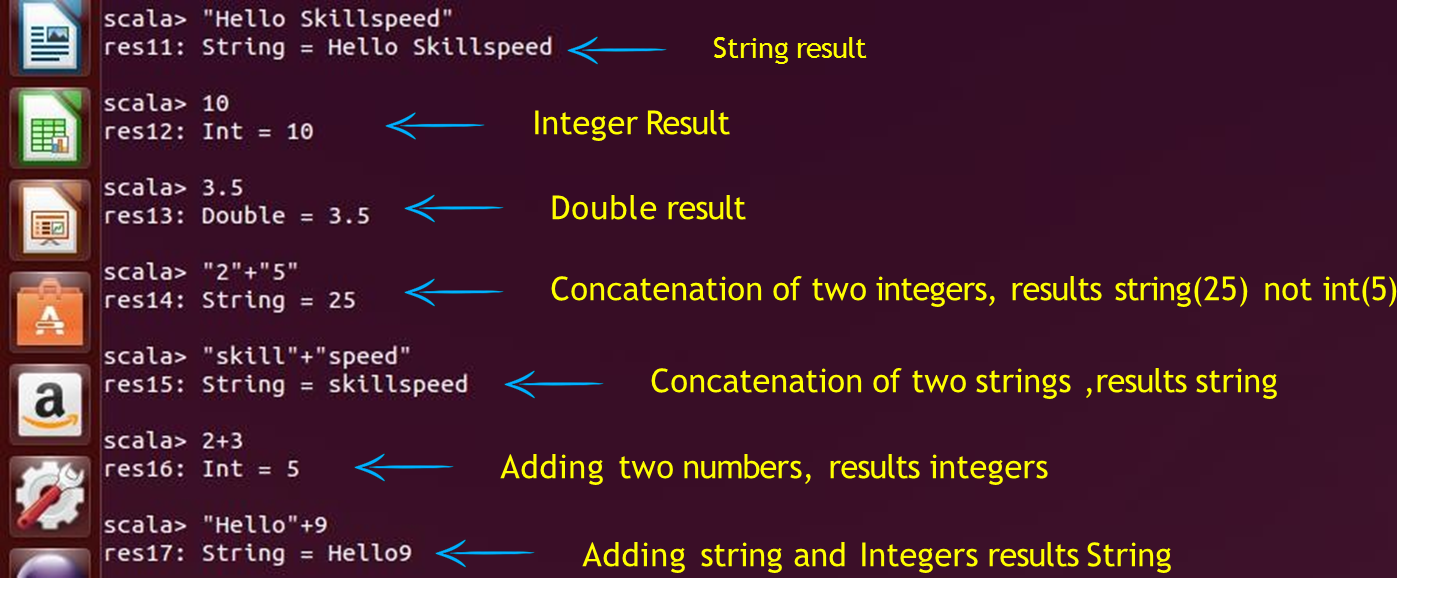
Few examples
Variables Types in Scala
Variables are simply names used to refer to some location in memory – a location that holds a value with which we are working
Scala variables come in two shapes: Values and Variables
Values
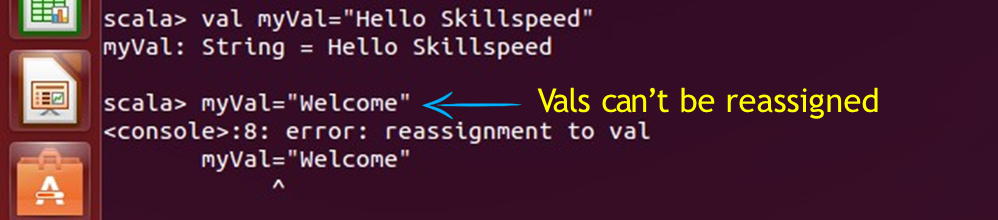
Values: Immutable - “val” (Read only)
- Similar to Java Final Variables
- Once initialized, Vals can’t be reassigned
 —
—Variables:
Mutable - “var” (Read-write) - Similar to non-final variables in Java
Here, myVar is declared using the keyword var. This means that it is a variable that can change value and this is called mutable variable  —
—
Type Inference :
When you assign an initial value to a variable, the Scala compiler can figure out the type of the variable based on the value assigned to it This is called type inference Once a type is assigned to a variable, it remains same for entire scope 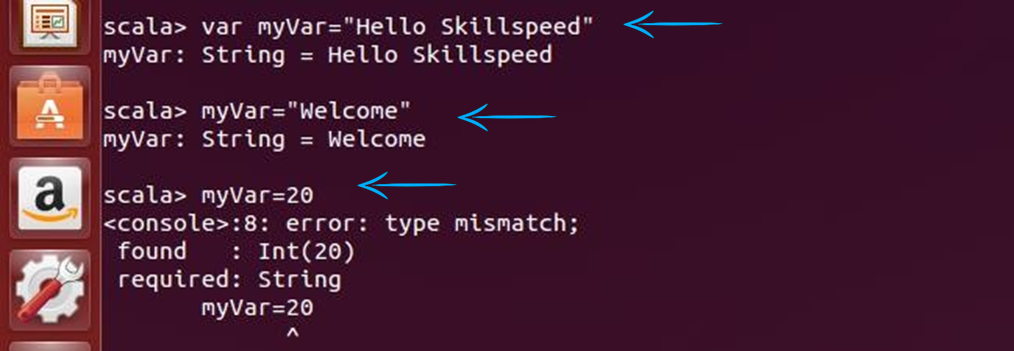
Thus, Scala is Statically Typed language
Assigning Block Expression
- In Java or C++ a code block is a list of statements in curly braces { }
- In Scala, a { } block is a list of expressions, and result is also an expression
- The Value of a block is the value of the last expression of it
 —
—Lazy Values
- One nice feature built into Scala are “lazy val” values.
- Lazy value initialization is deferred till it’s accessed for first time
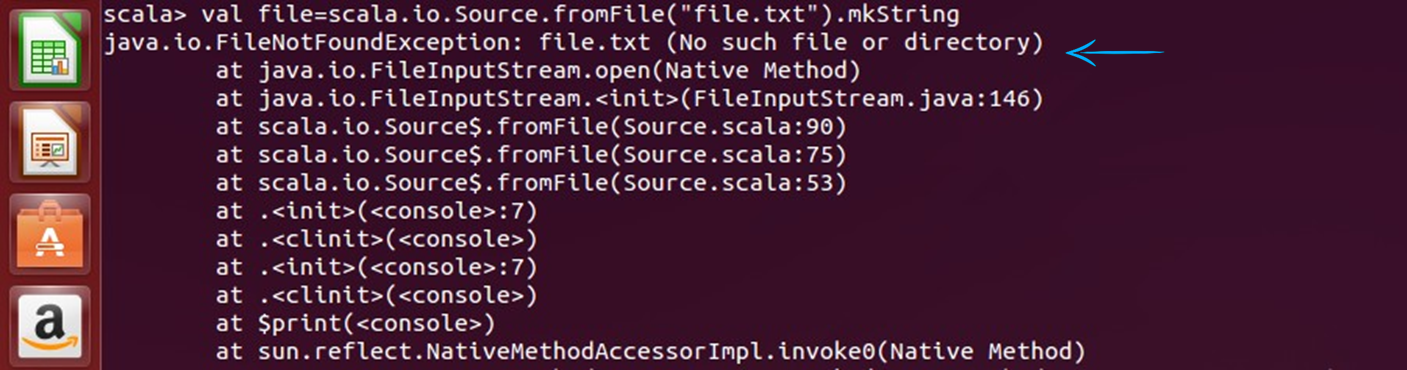
- For example : If you want to read a file abc.txt, if the file is not existing , you will get FileNotFoundException exception
 —
—Lazy Values (cont’d)
But if you initialize the value as Lazy, you won’t get this error, because it will delay the initialization till it accesses the file abc.txt

- Lazy values are very useful for delaying costly initialization instructions
- Lazy values don’t give error on initialization, whereas no lazy value do give error
Check your Understanding
If val a = (1, 2, 4,11, "Robert",5,9,11,2.5 ) then a._5?
- No value , its wrong syntax
- 5
- Nil
- “Robert”
Control Structures in Scala
- Control Structures controls the flow of execution
- Scala provides various tools to control the flow of program’s execution
- Some of them are
if..else
while
do-while
foreach
for
Control Structures in Scala (cont’d): if-else
An if statement can be followed by an optional else statement, which executes when the boolean expression is false.
- if-else syntax in Scala is same as Java or C++
- In Scala, if-else has a value, of the expression following it
- Semicolons are optional in Scala
 —
—Control Structures in Scala (cont’d): if-else
Every expression in Scala has a type. First If statement has a type Int Second statement has a type Any. Type of a mixed expression is supertype of both branches

Control Structures in Scala (cont’d): while loop
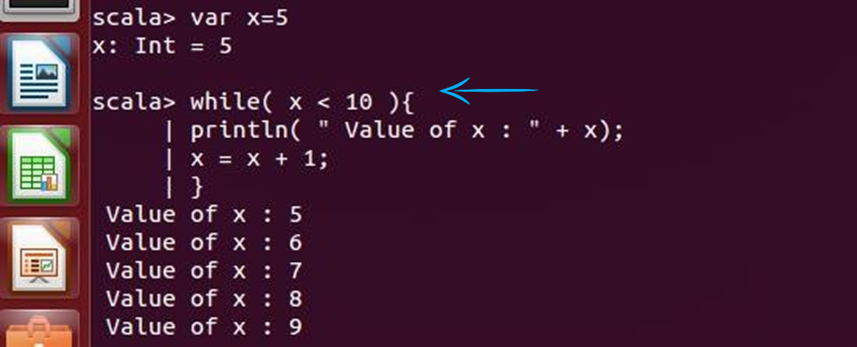
- A while loop statement repeatedly executes a target statement as long as a given condition is true
- In Scala while and do-while loops are same as Java
 —
—Control Structures in Scala (cont’d): do- While Loop
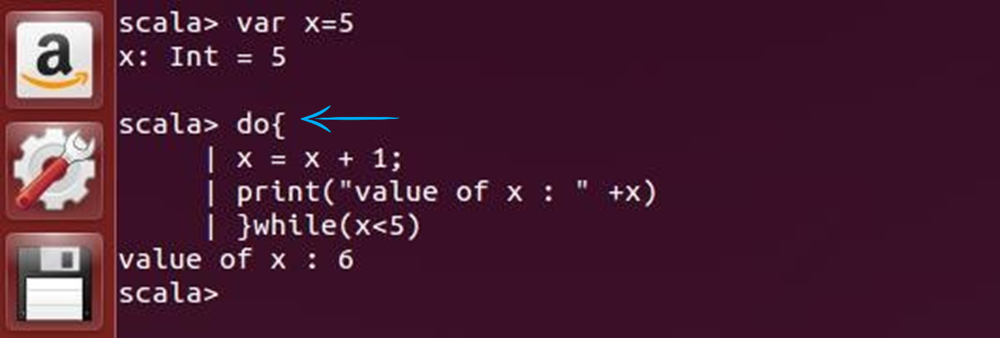
A do…while loop is similar to a while loop, except that a do…while loop is guaranteed to execute at least one time Syntax:
 —
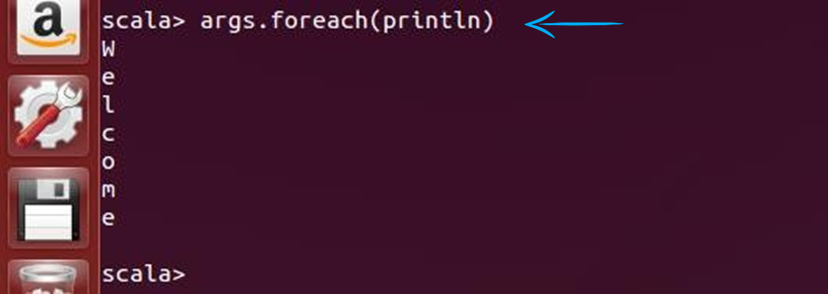
—Control Structures in Scala (cont’d): foreach Loop
 —
—Control Structures in Scala (cont’d): foreach Loop with function
 —
—Control Structures in Scala (cont’d): for loop
for loop can execute a block of code for specific number of times. Scala doesn’t have for (initialize; test; update) syntax
for( var x <- n ) {
//Block of statements;
}
Scala: For Loop : to vs. until
You can use either the keyword to or until when creating a Range object. The difference is, that to includes the last value in the range, whereas until leaves it out. Here are two examples:
 —
—Check your Understanding
What is the output of the following program?
for (x <- 'a' until 'f') print(x)- Error
- abcde
- abcdef
- None of these
Control Structures in Scala: for Loop (cont’d)
Advanced For Loop: can have multiple generators in for loop 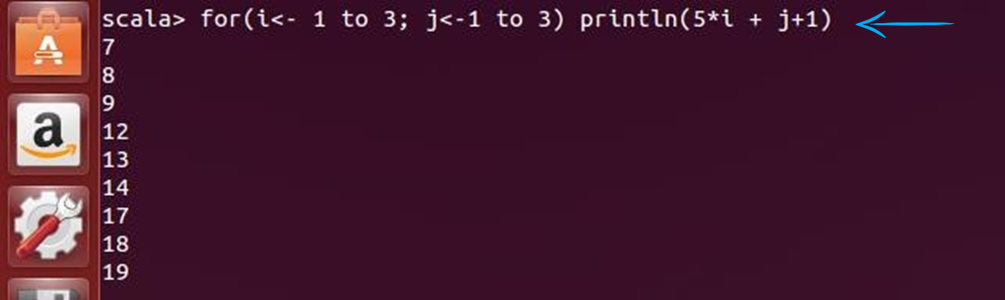
Control Structures in Scala: for Loop(cont’d)
We can put conditions in multi generators for loop 
Control Structures in Scala: for Loop(cont’d)
We can introduce variables in loop! 
Control Structures in Scala: The for Loop with Yield
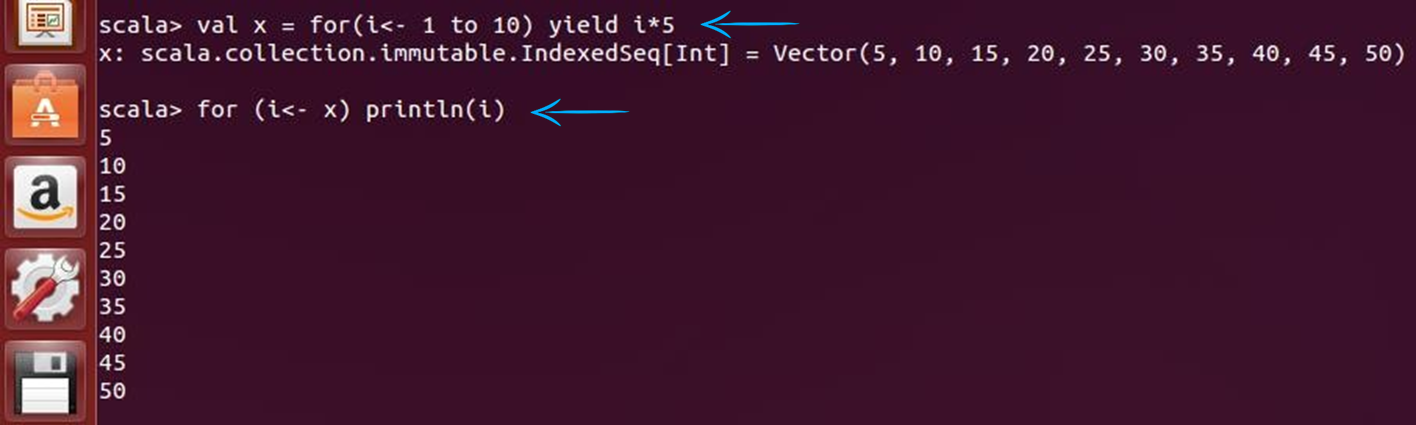
If the body of for loop starts with yield, it returns a collection of values
val x = for(i<- 1 to 10) yield i*5
 —
—
Functions
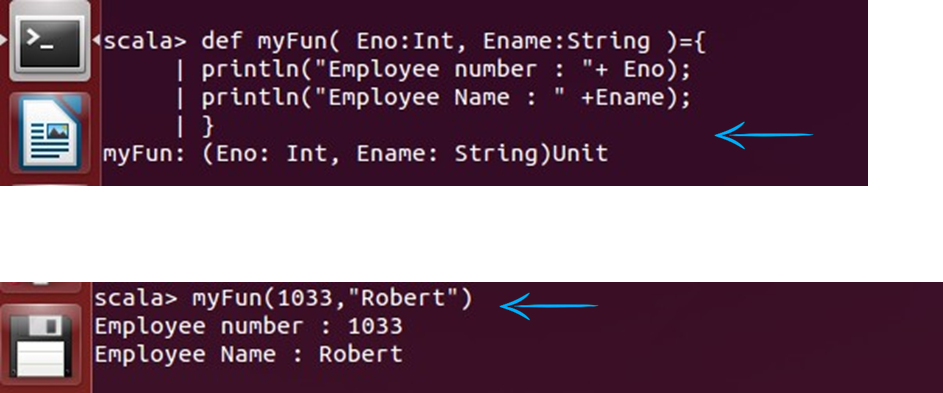
A function is a group of statements that together perform a task Scala function is a complete object which can be assigned to a variable The last statement in the function is the return value. You can create functions with “def” keyword
def functionName ([list of parameters]) : [return type] = {
    function body
    return [expr]
}
 —
—
Functions (cont’d)
We can provide defaults to function arguments, which will be used in case no value is provided in function calls 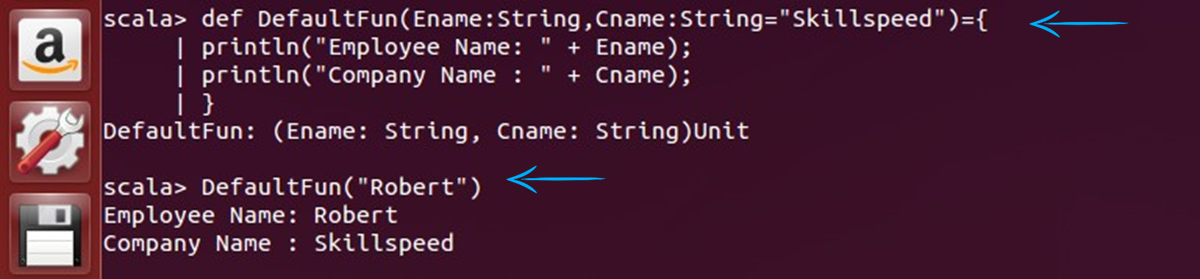
Functions (cont’d)
- We can specify argument names in function calls
- In named invocations the order of arguments is not necessary
- We can mix unnamed and named arguments, if the unnamed argument is the first one. We can specify argument names in function calls
- In named invocations the order of arguments is not necessary
- We can mix unnamed and named arguments, if the unnamed argument is the first one
Scala supports variable number of arguments to a function
Check your Understanding
What is the output of the following?
def concatStr(a:String, b:Int=2 , c:String) = {a + b + c}
println(concatStr( "Hi",200, "Welcome"))
- Hi2Welocme
- Hi200Welcome
- Error
- Hi2200Welcome
Leave a Comment
Your email address will not be published. Required fields are marked *